
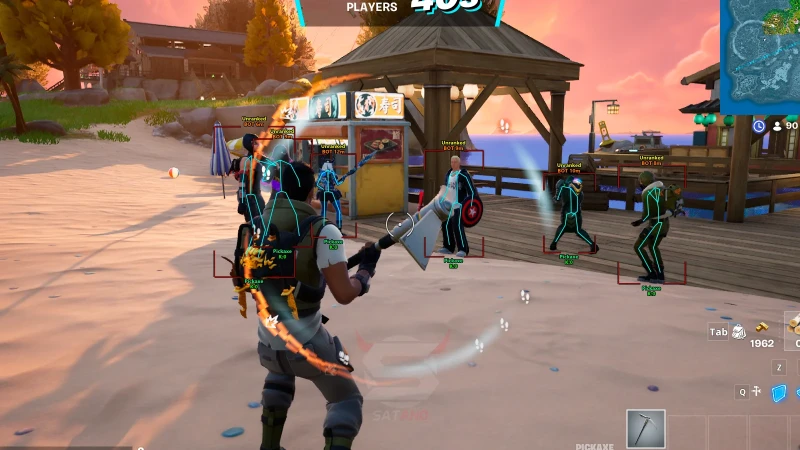
Fortnite Aimbot Explained: Target Selection, Aim Assistance, and Smoothing Features
How Fortnite aimbot targeting works: FOV, bone selection, smoothing, hold keys, and filters that keep assistance inside a readable range.
Fortnite aimbot is a targeting stack, not a magic snap. It picks a valid player inside a FOV cone, chooses a bone or hitbox, then moves or eases the aim point toward that bone with a smoothing curve. People who search how to get aimbot in Fortnite usually want those controls explained—not a console command. Built-in Creative tools do not add this to Ranked.
This guide covers target selection, assistance modes, and smoothing. Pair it with player ESP if you want vision without a lock, and with cloud DMA if you care how the read path sits next to Easy Anti-Cheat.
Target selection: who the lock is allowed to pick
Selection runs before any mouse move. The overlay scores players in FOV by distance, screen center, and visibility. A clean config skips knocked players, skips squadmates, and ignores bots if you only want human fights.
Bone pick matters in Fortnite because builds and height changes hide the head for long stretches. Head-only FOV fails when someone is in a 1x1. Chest or closest-bone modes keep the lock on a shootable mesh. Switch bone by weapon: AR can stay higher; shotgun close range often wants a slower chest curve.
FOV, distance, and through-build rules
FOV is the circle on screen where a target is legal. Small FOV means the lock only helps when you already aimed near them. Large FOV looks like a magnet in replay. Distance caps stop the crosshair jumping to a player across zone that you cannot pressure.
Visibility filters stop the aim point from traveling through a wall or a piece you cannot shoot. If the stack has no visible-only option, you will fight your own builds. Test in Creative against a dummy in a box before Ranked.
Aim assistance modes
- Hold-to-aim: side mouse button. Most operators start here. You still choose when the curve runs.
- Always-on with a deadzone: weaker pull unless the target is already near the reticle.
- Aim on fire: curve starts when you shoot. Useful for AR spray, noisy for shotgun timing.
Controller-style “aim assist” in Fortnite is a different system. PC mouse aimbot is overlay math on top of raw input. Do not mix stories. If you play on controller, treat this article as PC overlay behavior only.
Smoothing, prediction, and humanized curves
Smoothing is how fast the aim point closes the gap. Zero smoothing is a snap. High smoothing is a slow slide that can miss a peek. A two-stage curve (faster into FOV, slower on the bone) is what most 2026 menus expose as “smooth X / smooth Y” or a single 1–20 slider.
Prediction leads a strafing target. Too much lead overshoots 90-degree jitters in a box fight. Recoil compensation is a separate slider: it should follow Fortnite’s current bloom and recoil pattern for that weapon, and it should be turned down after a patch until the weapon file is confirmed.
How it sits next to Easy Anti-Cheat
EAC still loads a session kernel driver on Windows while Fortnite runs. Aim modules that last through a season ride an external or DMA read path, then send humanized mouse input—they do not patch the game binary. After a client update, wait for status, then re-test FOV and smoothing in a casual playlist. Details: Fortnite anti-cheat explained.
Conservative first-week presets: small FOV, hold key, chest bone, visible-only, no rage distance. That is the setup you compare in a 2026 feature review, not a 360 lock.
When you want the rest of the suite around this module, the maintained Fortnite cheats pages list aimbot next to ESP, radar, loot, cloud DMA, and HWID in one portal.
FAQ
Is there a built-in Fortnite aimbot command?
No. Creative and UEFN tools do not grant Ranked aimbot. Searches for how to get aimbot in Fortnite point at overlay software with FOV and smoothing, not a chat command.
What smoothing value should I start with?
Start slower than you think, on a hold key, with a small FOV. If the curve still snaps in replay, raise smoothing or shrink FOV. Change one slider per session.
Should aimbot run with ESP on?
You can run either module alone. Many players keep ESP on and aim on a hold key so the lock only runs when they already took a fight. See the ESP guide for draw-distance caps that match your FOV.
Does a tighter FOV change how EAC or ML scoring sees input?
Tighter FOV and slower smoothing sit closer to normal mouse paths. Wide FOV with zero smooth is a stronger tracking signature in replays and in server stats. Configs are part of the same stack as DMA load path.
Where do I check the module after a patch?
Portal status first, then a Creative or casual playlist. Do not copy old FOV numbers onto a new Fortnite weapon file without a test.